
Free Email Verifier
Check if an email address is real — instantly, no signup. We validate the format, look up the domain's mail server, and flag disposable and role addresses, then show you every check we ran.
What we actually check: address format, whether the domain has a working mail server (MX record), whether it’s a disposable/throwaway provider, whether it’s a role inbox like info@, and whether it’s a free consumer provider rather than a company domain. We do not claim mailbox-level certainty — a true mailbox probe requires an SMTP handshake that most mail servers block or deliberately answer inaccurately. Anyone promising 100% accuracy is guessing; we’d rather show you the evidence.
Is this email real? How to check
How do I check if an email address is real?
Paste it into the free verifier above. In about a second it confirms the address is correctly formatted, that its domain has a mail server (an MX record) able to receive email, and that it is not a disposable or role inbox. It cannot prove the individual mailbox exists — no tool can do that reliably without sending to it.
What a result looks like
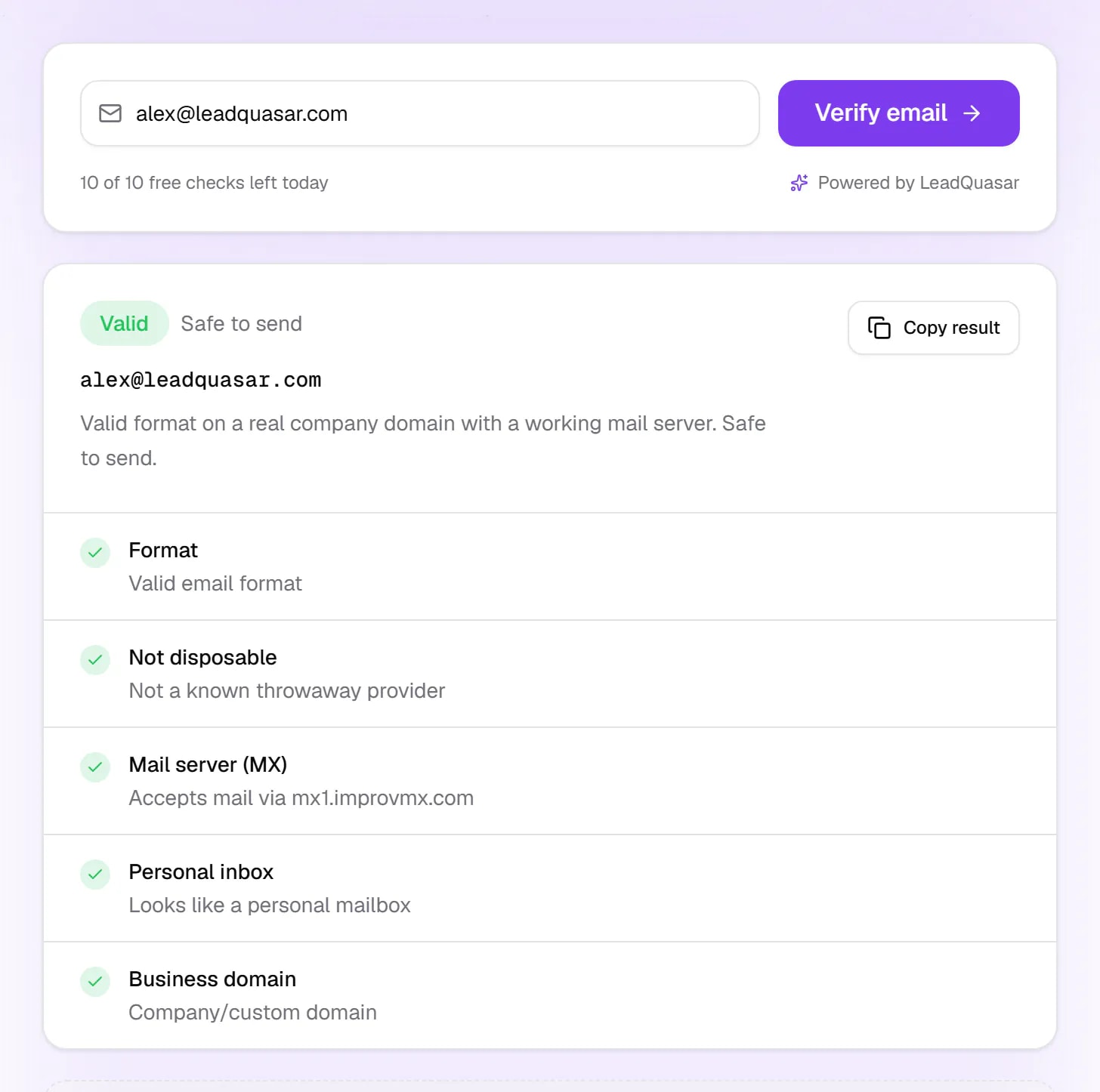
| Check | What it tells you | If it fails |
|---|---|---|
| Format | The address is written correctly — one @, allowed characters, a real-looking domain. | Invalid. Usually a typo; nothing can be delivered to it. |
| Disposable provider | The domain is not a known throwaway service such as Mailinator or 10MinuteMail. | Invalid. A temporary inbox that nobody will read. |
| Mail server (MX) | The domain publishes a mail server, so it can receive email at all. | Invalid. No mail server means every message bounces. |
| Role inbox | The address looks personal rather than a shared inbox like info@ or sales@. | Risky. It delivers, but to a shared queue with poor reply rates. |
| Business domain | The address is on a company domain, not a free provider like gmail.com. | Risky. Fine for a person, weak as a B2B contact. |
The honest limit: proving that one specific mailbox exists needs an SMTP handshake on port 25. Cloud hosts block that port, most mail servers refuse or rate-limit the question, and catch-all domains answer “yes” for every address. So a “valid” verdict means the address passed every check that can be run without emailing it. For a list you are about to send to, the final test is a small first batch and a close eye on bounces.
Why verify emails before you send
Email verification is not about tidiness. It protects the one asset in cold outreach you cannot buy back: your sending domain’s reputation.
Bounces wreck your sender reputation
Cross a ~2% bounce rate and mailbox providers start throttling you; cross 5% and they may route your whole domain to spam. A single dead domain in a small list can do it.
You pay for bad data twice
Once when you buy or scrape the list, again when your sequencer charges you per contact to email an address that never existed.
Role inboxes quietly kill reply rates
info@ and sales@ go to a shared queue nobody owns. Knowing an address is a role inbox before you write a personalised opener saves you the effort.
How the email verifier works
- Step 1
Paste the address
Type or paste any email address. Nothing to install, no account, nothing to confirm.
- Step 2
We run the checks
Format, mail server (MX) lookup on the domain, disposable-provider match, role-inbox match, and business-vs-free-provider — in about a second.
- Step 3
Read the evidence
You get a verdict — valid, risky or invalid — plus every individual check and the reasoning, so you can decide for yourself.
Email verification — frequently asked questions
Is this email verifier really free?
Yes. You get 10 free email checks per day with no account, no credit card and no email capture form — the result appears right on the page. We built the tool for our own sales team and left it open because the best advert for a verified lead database is showing you what verification actually looks like. If you need more than 10 checks a day, a free LeadQuasar account gives you access to 9.6 million+ contacts whose emails are already verified.
Does this email exist?
Paste it into the verifier and you get the part that can be proven: whether the address is correctly formatted and whether its domain has a mail server (MX record). If the domain has no mail server, the address cannot exist as a working inbox and anything sent to it will bounce. What no free check can prove is that the individual mailbox exists — mail servers either refuse that question or, on catch-all domains, accept every address. A 'valid' result means the address passed every check that can be run without sending to it.
Is this email legit or safe to send to?
The verifier flags the three things that make an address a bad one to send to: a domain with no mail server (it will bounce), a disposable throwaway provider (nobody will read it), and a role inbox such as info@ or sales@ (it delivers, but to a shared queue). It also tells you whether the address is on a company domain or a free consumer provider like gmail.com. It does not scan messages you have received for phishing — if you are unsure whether an email in your inbox is genuine, do not click its links, and check the sender's domain against the organisation's real website.
How do I tell if a domain is a free email provider?
Compare the part after the @ with the big consumer mail services. The verifier does this for you: it checks the domain against a list of free providers, including gmail.com, outlook.com, hotmail.com, yahoo.com, icloud.com and proton.me, and labels the address either a free consumer provider or a company domain. A domain that is not on that list is treated as a company or custom domain, so for an unfamiliar one, open the domain in a browser: a real business usually has its own website there.
How do I know whether an email address from a lead database is still active?
Check that its domain still has a mail server, then look at when the record was last verified. If the verifier finds no MX record, the address is dead and anything sent to it will bounce. If the domain passes, no free check can prove the individual mailbox still exists, so a recent verification date and a clean bounce history are the best evidence you have. Remove addresses that bounce after your first send.
How accurate is email verification?
It depends on what is being claimed. We can establish with near-certainty whether an address is correctly formatted, whether its domain has a working mail server (an MX record — no MX means the address physically cannot receive email), whether the domain is a known disposable/throwaway provider, and whether the address is a role inbox like info@ or sales@. Those four checks catch the overwhelming majority of real-world bad addresses: typos, dead domains, burner signups and shared inboxes. What nobody can reliably promise is mailbox-level certainty — see the next question.
Can you tell me if the mailbox actually exists?
Honestly, no — and neither can anyone else, reliably. Proving that a specific mailbox exists requires an SMTP RCPT-TO handshake on port 25, which cloud hosts block by default and which most modern mail servers refuse, rate-limit or answer with a deliberate 'accept-all' lie to defeat exactly this kind of probing. Providers who advertise 99% mailbox accuracy are mostly inferring it from patterns and historical bounce data. We would rather show you the evidence we do have and let you make the call.
What is a disposable or role email address, and why does it matter?
A disposable address comes from a throwaway provider like Mailinator or 10MinuteMail — it exists for a few minutes so someone can grab a download without giving you a real address. A role address (info@, sales@, support@, hello@) is a shared inbox rather than a person. Both hurt you: disposable addresses inflate your list with people who will never read anything, and role inboxes have poor reply rates and are treated as spam-prone signals by some filters. Removing both before you send protects your deliverability.
Why does verifying emails before sending matter?
Mailbox providers watch your bounce rate. Above roughly 2% they begin throttling you, and above 5% they may start routing you to spam or blocking you outright — for every recipient, not just the bad ones. One dead domain in a list of a hundred can be enough to damage the sender reputation of the whole domain you send from. Verification is a few seconds of work that protects an asset that takes months to rebuild.
Can I verify a whole list of emails at once (bulk verification)?
This free tool checks one address at a time, which is what most people need when they are sanity-checking a contact they just found. If you are working at list scale, the better fix is upstream: instead of buying a list and then cleaning it, start from contacts that are already verified. LeadQuasar holds 9.6 million+ B2B contacts across 170+ industries with verification status and a 0–100 quality score on every record, so you only unlock the ones worth sending to.
Skip the verifying — start from verified
Verifying one address at a time is the fix for a bad list. The better move is not to build a bad list in the first place.
9.6 million+ contacts we already verified for you
Create a free account to search them — and let LeadQuasar AI find the prospects, research the company and write the first email. Free trial, no credit card to start.
Get started freeSearch free forever · 50 unlocks a day, no card
The rest of the toolkit
Every one of these is free and hands off to the next.